
You've typed the same instructions to AI systems dozens of times. Format this report with our company colors. Apply our writing style to this email. Generate a presentation following our template. Extract data from this spreadsheet using our standard transformations. Every time, you reconstruct the same context, explain the same preferences, provide the same examples.
There's a better way. Skills let you package those instructions once and have them available automatically whenever relevant. Not through complex integrations or elaborate setups. Through structured files that AI systems understand and apply intelligently.
This isn't theoretical architecture or philosophical discussion about AI capabilities. This is practical implementation guidance. How to actually create skills that solve your real workflow problems.
What works, what doesn't, and how to troubleshoot when skills behave unexpectedly. The hands-on details that make the difference between skills that sit unused and skills that transform how you work.
Understanding What You're Actually Getting
Before diving into creation
Before diving into creation, understanding what skills provide clarifies when to use them versus other approaches. Skills are specialized instructions that activate dynamically when your request matches their purpose. You upload them once. They work across all your conversations, projects, and contexts.
When you ask for something the skill handles, it loads automatically, guides the AI through your preferred approach, and produces consistent results.
⚡Progressive Disclosure in Action
This efficiency matters practically. You can maintain dozens of skills without degrading performance. Each conversation uses only the skills it needs. The rest stay available but dormant, consuming minimal resources.
Access Requirements and Setup
Getting started in under two minutes
The actual enablement process takes under two minutes. Navigate to Settings, then Capabilities. Ensure code execution and file creation toggles are on. Scroll to the skills section. Toggle on any provided skills you want to use.
Navigate to Settings
Open Settings, then find the Capabilities section in your AI platform.
Enable Prerequisites
Ensure code execution and file creation toggles are enabled.
Access Skills Section
Scroll to the skills section and toggle on desired skills.
Upload Custom Skills
Click upload skill and select a ZIP file containing your skill folder.
The requirement for paid accounts reflects the computational resources skills consume. The code execution environment that makes skills powerful requires infrastructure beyond basic chat capabilities.
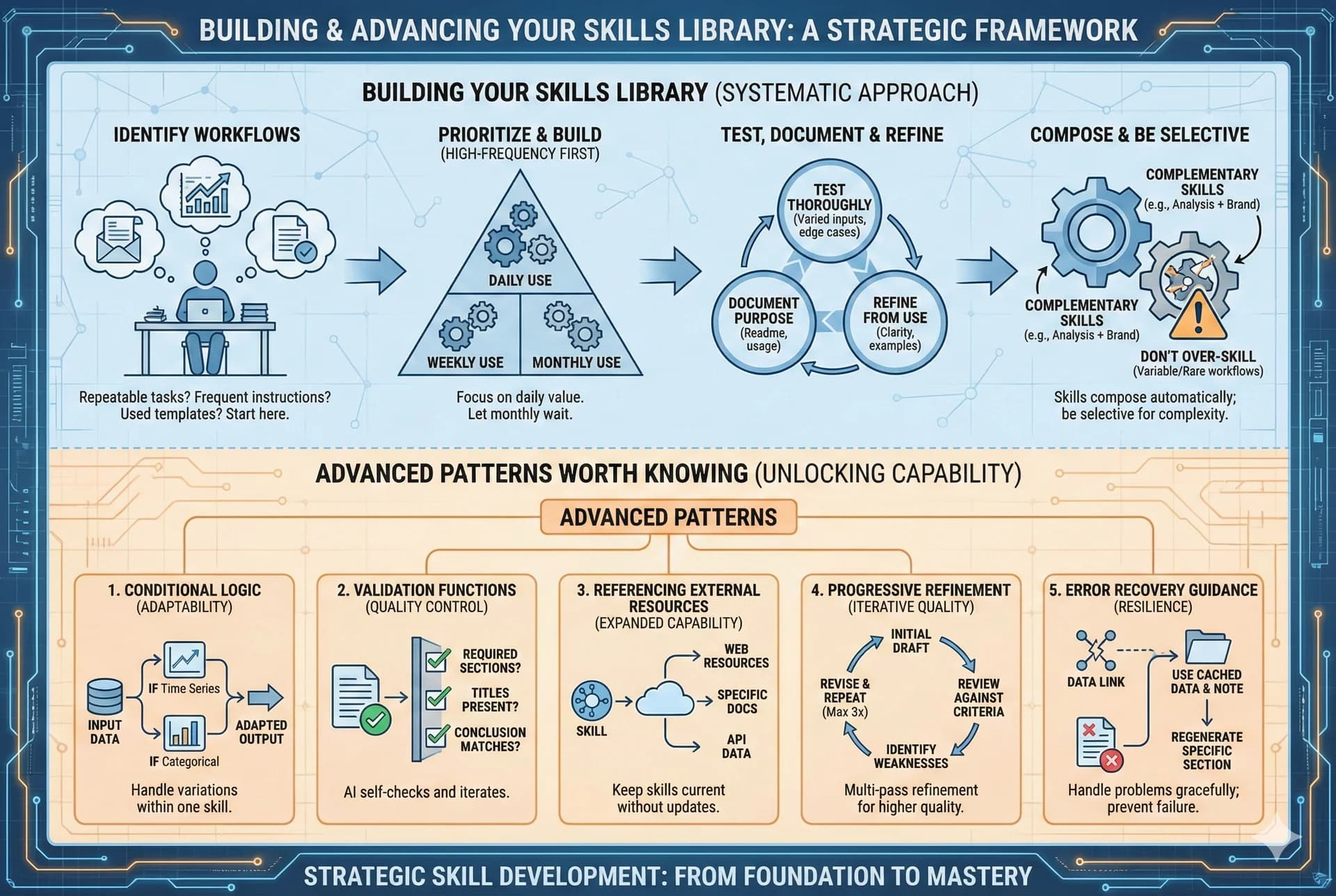
Once you've completed setup, you're ready to start building your skills library: from understanding what skills can do to creating your own custom capabilities.
Two Paths to Creating Custom Skills
Choose your approach
Creating your first custom skill offers two distinct approaches depending on your preferences and constraints.
Conversational Method
- ✓Fastest path to working skills
- ✓No technical knowledge required
- ✓Built-in skill creator guides you
- ✓10-30 minutes typical
Manual Method
- ✓More control over structure
- ✓Better for complex workflows
- ✓Precise control over skill design
- ✓15-45 minutes typical
Manual Method: File Structure
Create a folder with a descriptive name. Inside, create a file named SKILL.md. This filename is required and case matters.
---
name: Brand Guidelines Applier
description: Apply Acme Corp brand guidelines including
  official colors, fonts, and logo usage to presentations
  and documents when brand consistency is needed.
---

# Brand Guidelines Skill

## Overview
This skill ensures all outputs follow Acme Corp's
brand standards for visual consistency.

## Color Palette
- Primary: #CC7A60 (Salmon)
- Secondary: #D99178 (Light Salmon)
- Accent: #B56B52 (Dark Salmon)

## Typography
- Headlines: Inter Bold
- Body: Inter Regular
- Code: JetBrains Mono

## Usage Guidelines
Always apply these standards when creating...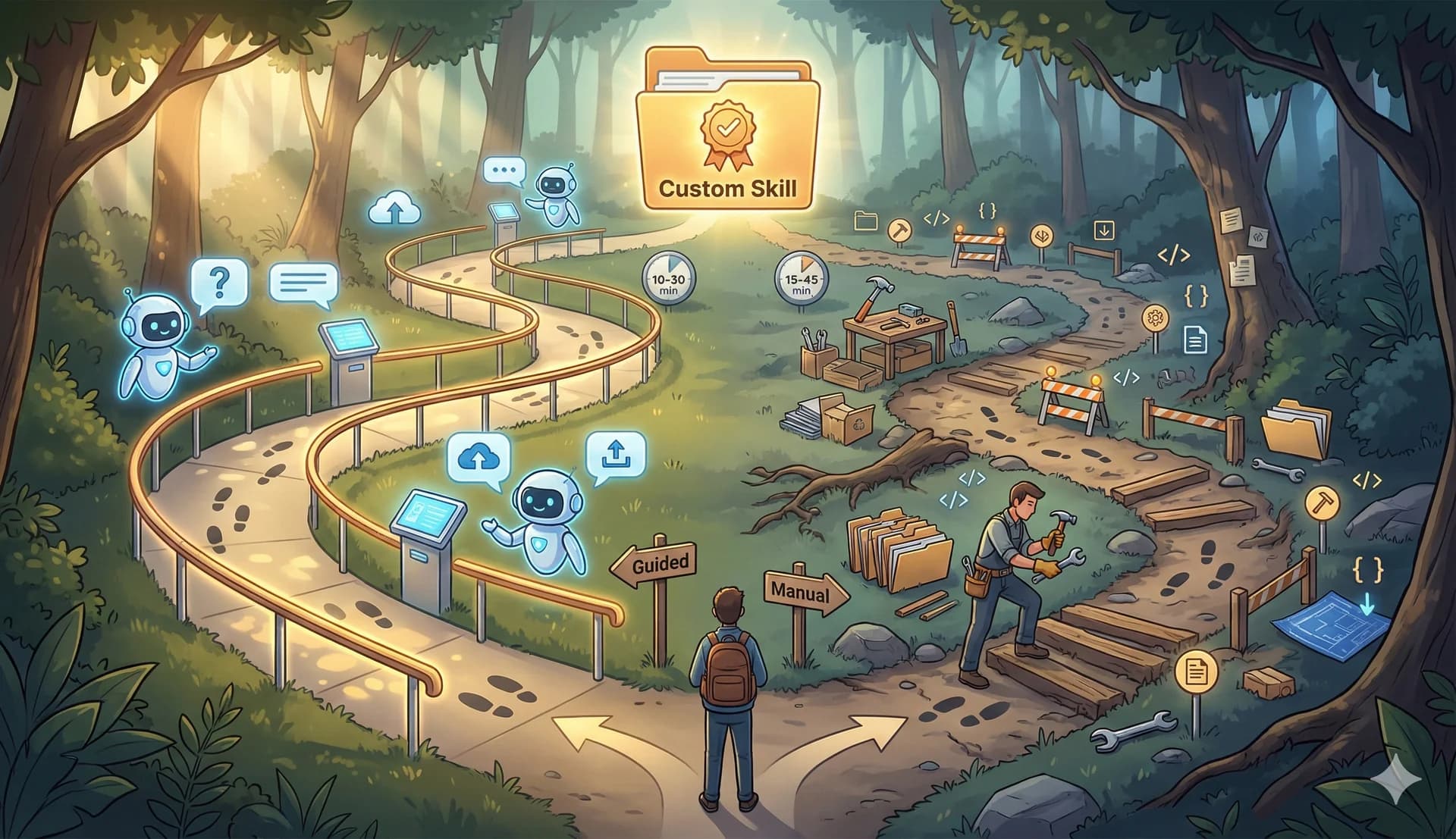
Both approaches produce the same result: a skill the AI can use automatically when appropriate. Choose based on whether you prefer guided creation or direct control.
Writing Effective Skill Descriptions
The 200-character trigger that makes or breaks your skill
The description field in your skill's frontmatter determines the success or failure of automatic activation. This 200-character limit requires precision.
✗ Weak Descriptions
- “Help with documents”
- “Brand guidelines”
- “Data analysis”
- “Format things nicely”
Too vague - doesn't specify what or when
✓ Strong Descriptions
- “Apply Acme Corp brand colors, fonts, and logo to presentations”
- “Generate quarterly financial reports with CFO-approved template”
Specific capability + clear context
The description serves as a matching criterion. When your request mentions presentations and brand consistency, the brand guidelines skill should activate. Vague descriptions make matching unreliable.
Common pitfalls include describing how the skill works rather than when to use it, listing features without indicating contexts, and using terminology that your natural requests wouldn't include.
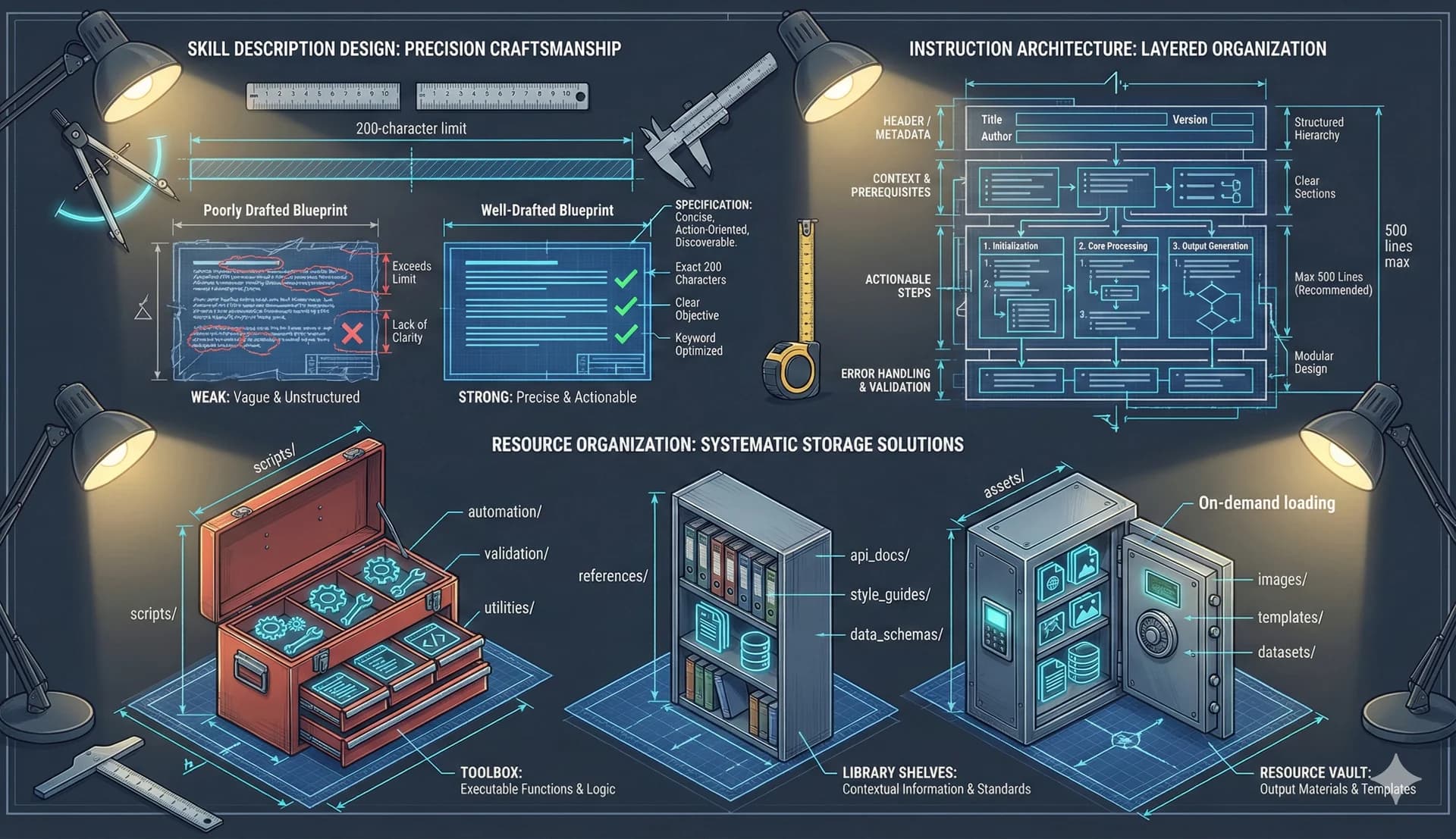
The AI matches your conversational request against skill descriptions. Write descriptions that match how you actually ask for things.
Structuring Skill Instructions
The markdown body that guides execution
After the frontmatter comes the markdown body containing actual instructions the AI follows when the skill activates. This section determines execution quality.
Start with Overview
Explain what the skill accomplishes and when to use it.
Clear Headings
Organize procedural guidance with distinct phases.
Specific Examples
Show what professional means for your context.
Reference Resources
Tell the AI when and how to use bundled files.
Keep It Lean
Under 500 lines - split into references if needed.
Imperative Form
'Apply brand colors' not 'You should apply...'
Write in imperative form. “Apply brand colors to all headings” rather than “You should apply brand colors to headings.” Direct instructions reduce ambiguity and improve consistency.
Avoid explaining why things work unless the reasoning affects execution. The AI doesn't need to know why your company chose specific brand colors. It needs to know which colors to use and where to apply them.
Bundling Supporting Resources
Scripts, references, and assets
Skills become powerful when you bundle supporting materials beyond just markdown instructions. Three standard directories serve distinct purposes.
Deterministic Operations
Executable code for tasks requiring deterministic reliability. The AI can invoke scripts without loading them into context, preserving valuable token space.
Context On Demand
Documentation the AI loads on demand. When the AI encounters a situation requiring deep knowledge, it consults references rather than guessing.
Output Resources
Files used in outputs - templates, logos, boilerplate. The AI references assets by path but doesn't load them into context. A 5MB template consumes zero context tokens.
Skills vs Projects vs Custom Instructions
Choosing the right tool for the job
Understanding when to use each feature prevents misapplication and optimization failures.
Custom Instructions
- ✓Apply to ALL conversations
- ✓General preferences only
- ✓Keep concise - always loaded
- ✓Communication style, background
Projects
- ✓Static background knowledge
- ✓Loaded for project conversations
- ✓Bounded contexts
- ✓Product specs, team info
Skills
- ✓Dynamic activation
- ✓Work everywhere
- ✓Load only when relevant
- ✓Repeatable workflows
The key distinction: Projects are always-on within their container. Custom instructions are always on everywhere. Skills are always available but only load when relevant.
Practical application: Your company's brand guidelines belong in a skill because you need them sometimes across different contexts. Your current project's specifications belong in a project because everyone working on it always needs them. Your preferred response conciseness belongs in custom instructions because it applies to everything you do.
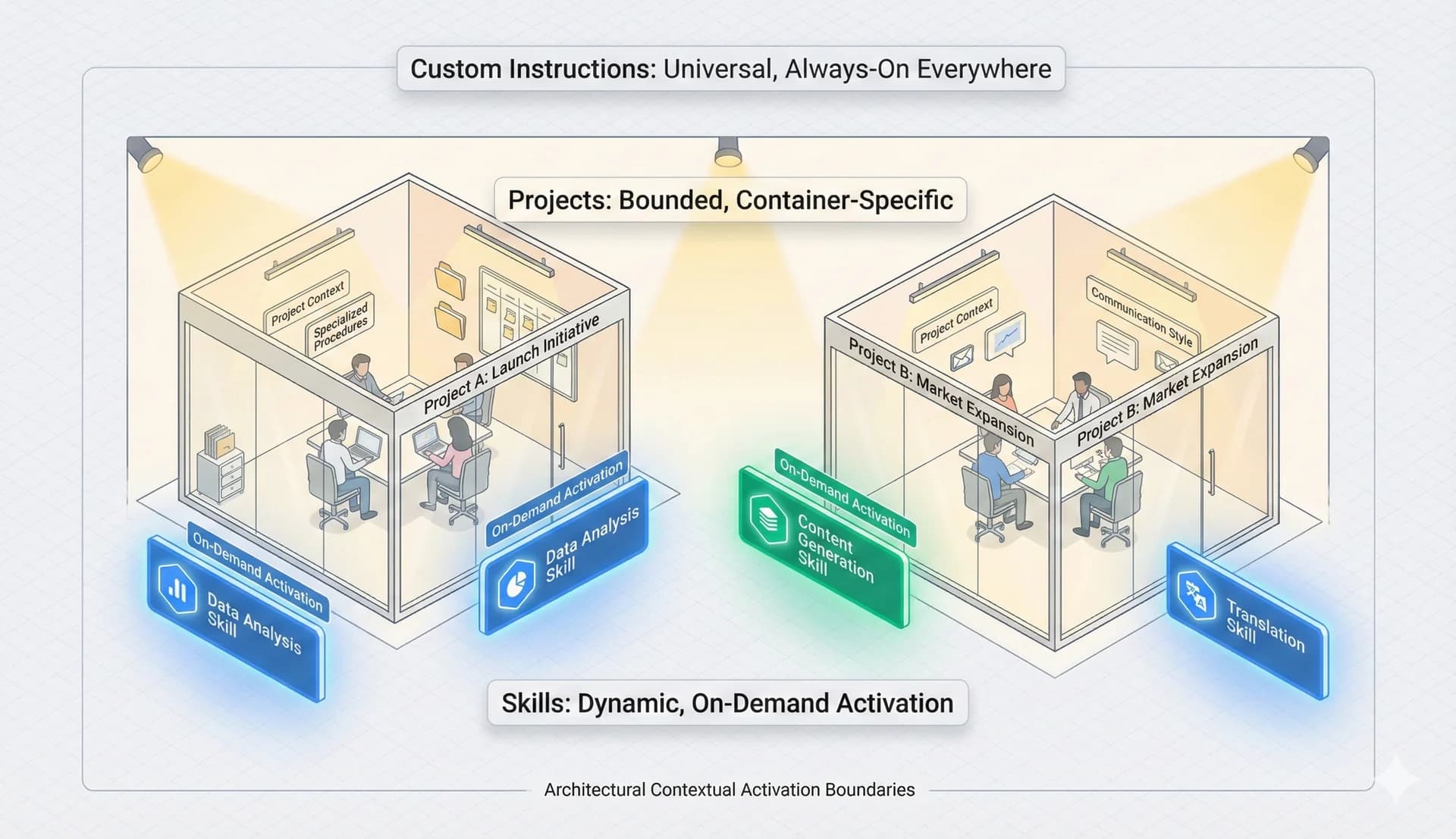
The distinction between always-on custom instructions, project-scoped context, and dynamically-activated skills: each serves a different purpose in your AI workflow architecture.
Troubleshooting Common Issues
When skills behave unexpectedly
⚠Skill doesn't activate when expected
Fix: Check description field. Does it clearly state what AND when? Try explicit keywords from description in your request.
⚠Skill activates but produces inconsistent results
Fix: Review instruction body. Are procedures clearly specified? Add specific examples where AI struggled. Check for contradictions.
⚠Skill claims to have activated but didn't use instructions
Fix: Strengthen imperative language. Change 'consider using' to 'always use'. Change 'might want to' to 'must'.
⚠AI claims a skill exists that you never created
Fix: Progressive disclosure systems occasionally hallucinate. Ignore these references or create the skill if useful.
⚠Skill works in one context but not another
Fix: Verify upload success. Check for conflicting instructions from projects or custom instructions in different contexts.
Advanced Patterns Worth Knowing
Unlocking additional capability
As you become comfortable with basic skills, advanced patterns unlock additional capability.
🔀 Conditional Logic
“If data includes time series, generate trend visualizations. If categorical, use comparison charts.” One skill handles variations.
✅ Validation Functions
“After generating report, verify all required sections present, charts have titles, conclusion matches analysis.” Self-checking outputs.
🔄 Progressive Refinement
“Generate draft. Review against criteria. Identify weaknesses. Revise. Repeat until criteria met or three iterations.”
🚧 Error Recovery
“If data source unavailable, use cached data and note staleness. If validation fails, regenerate just failed sections.”
From First Skill to Mastery
The progression happens naturally
The path from creating your first skill to effectively leveraging skills across workflows follows predictable stages.
Initial
Over/under specify. Description problems. Learning.
Middle
Better balance. Accurate triggers. Reliable results.
Advanced
Conditional logic. Validation. Graceful errors.
The ultimate goal isn't building the perfect skill library. It's building the right skills for your workflows and having them reliably available when needed. Skills that sit unused aren't valuable regardless of how well-crafted they are.
Start with one skill for one frequent workflow. Use it. Refine it. Build another. Gradually accumulate a working library that actually improves how you work. That practical accumulation beats elaborate planning any day.
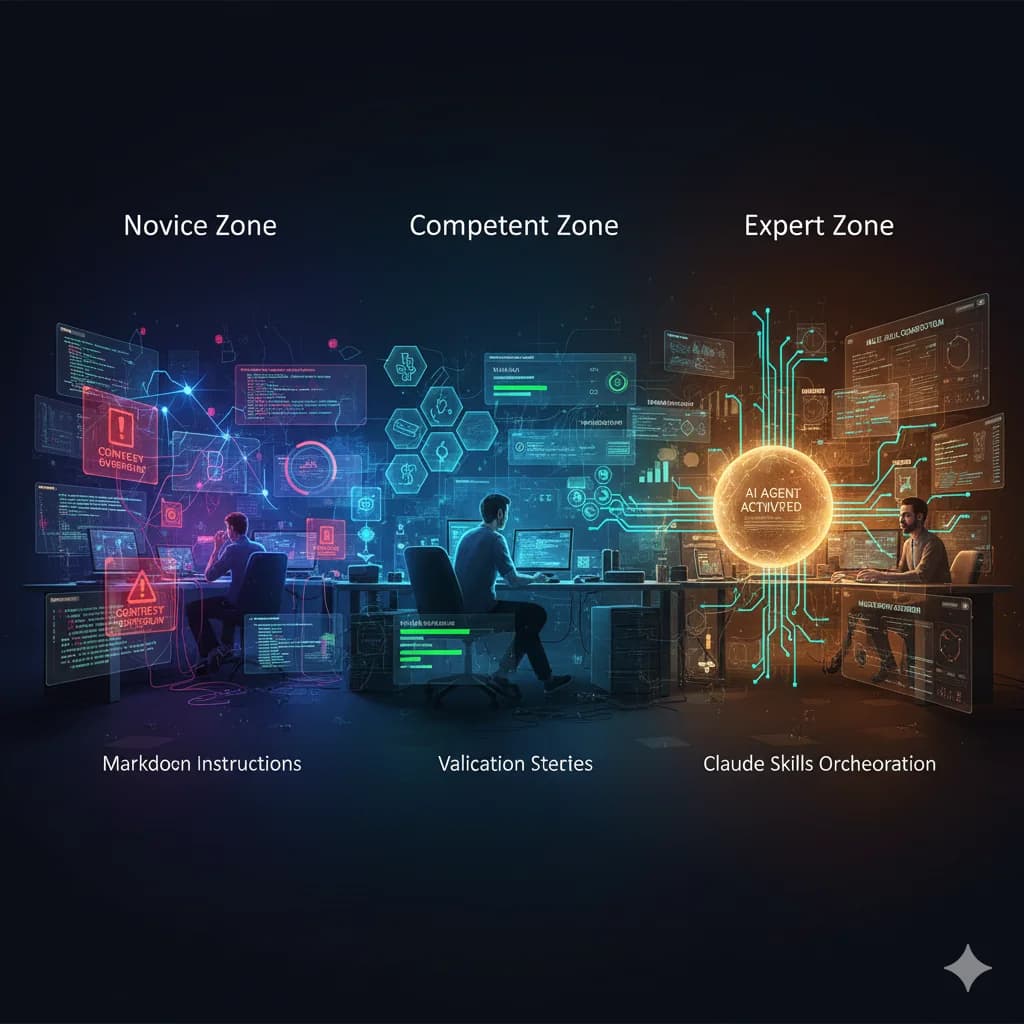
The natural progression from initial skill creation to mastery: learning through iteration, building confidence through usage, and developing an intuition for what makes skills effective.
Your AI can now learn your workflows
and apply them automatically.
The question is what you'll teach it first.
Share this article
Help others discover this content.
Written by the 10X Team
Building the future of AI-powered workflows. We help teams package their expertise into skills that scale.
Explore our skills libraryReady to Transform Your Workflows?
Explore our library of AI skills and start building more efficient processes today.
Explore Skills